
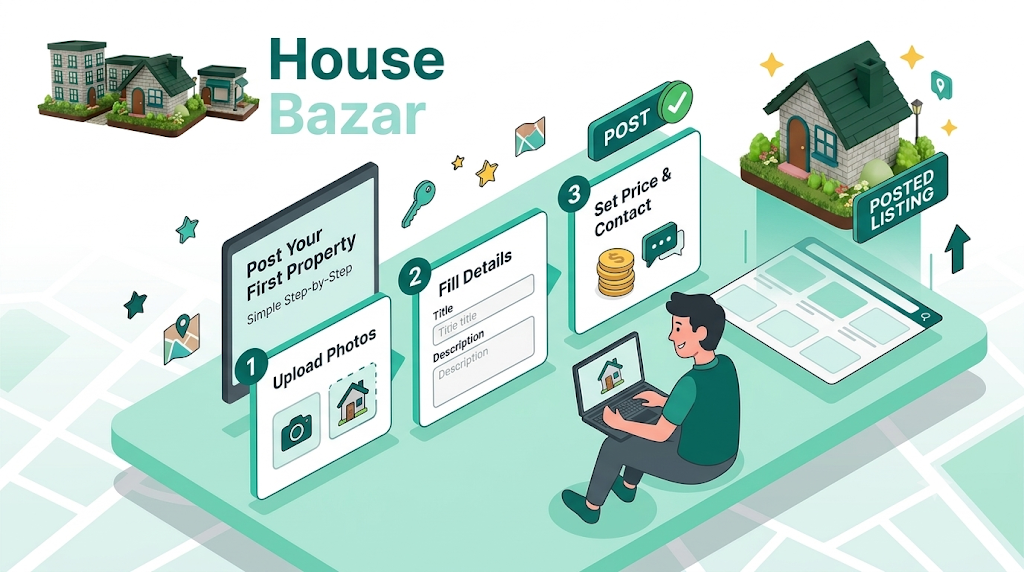
If you have ever tried to sell or rent out a property in Pakistan, you already know the drill. First you look for a property dealer. Then comes the commission, which is never small. And then the classic line: “Sir, bas do din mein customer aa raha hai”… and those two days quietly turn into two weeks.
This is exactly the problem free property listing platform “House Bazar” was built to solve. It gives you a simple, direct way to list your own property… house, plot, shop, or hostel… from your own phone, in just a few minutes. No dealer standing in between, no hidden charges, and best of all, interested buyers or tenants message you directly on WhatsApp (secure end to end encrypted chat).
In this guide, we will walk you through exactly how to post your first listing on HouseBazar, step by step. Let’s get started.
Why List Your Property on HouseBazar?
Before we get into the steps, it’s worth knowing what makes free property listing platform “House Bazar” different from other property websites in Pakistan:
- Your 3 listings are completely free, and completely free to renew after 30 days… no entry fee, no hidden charges, no commission. You can post right away and see how buyers respond.
- Direct WhatsApp contact button of seller or property owner on every all listing… anyone interested in your property can message you instantly on WhatsApp, with just one click, no need to save number first. No app-based chat getting buried, no saving numbers first.
- You can add a property video… not just photos. Simply link a YouTube video and buyers can take a full walkthrough of your property before even calling you. This builds trust fast, and trust is what closes deals.
- Pinpoint map location… HouseBazar’s interactive map shows buyers the exact location and surrounding area, so the very first question… “location kahan hai?”… is already answered before they even message you.
- A dedicated hostel listing option… HouseBazar is Pakistan’s first platform built specifically for verified hostel search with videos of hostel buildings and living rooms. If you run a boys‘ or girls’ hostel, this is a real opportunity to reach students directly and free of cost.
- Premium listings 100% free… Giving Free high quality listings to general public of Pakistan with no conversation monitoring (as people chat with each other on WhatsApp, which is secured and end to end encrypted) is a direct response to already dominant property marketplaces in Pakistan. Which charge a premium price for listing a property on their platform.
Now that you know why the free property listing platform “House Bazar” is worth using, let’s go through the actual listing process.
Step 1: Create Your Account or Log In with Google
Go to housebazar.pk and If you don’t have an account yet, simply sign up using your name, email, or simply click Sign up with Google… it takes less than a minute. Click on the sign in button in the top right corner.
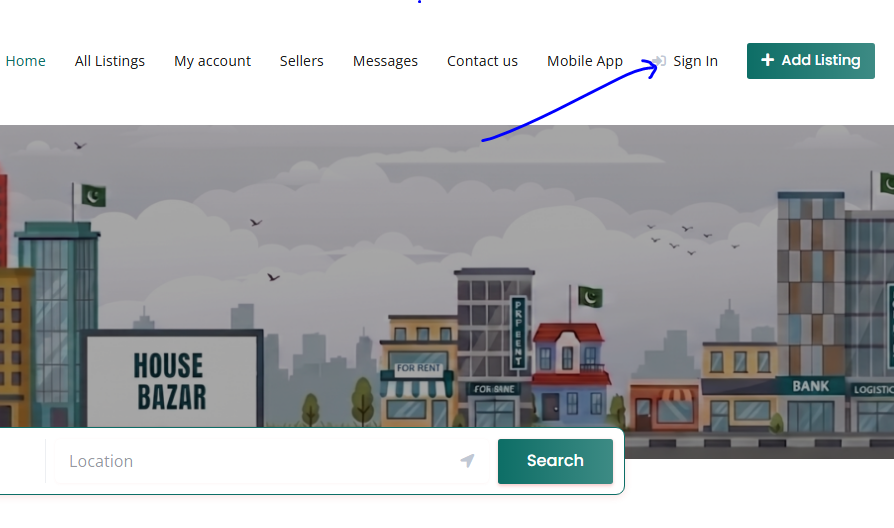
One important tip: use your active email and WhatsApp number. This is the number buyers and tenants will contact you on through WhatsApp, so getting this right matters more than any other detail.
Step 2: Click on “Add Listing” button
Once you’re logged in, look for the big Plus Button “+“ or “Add Listing“ button at the top right corner of the page. This is where your listing journey begins.
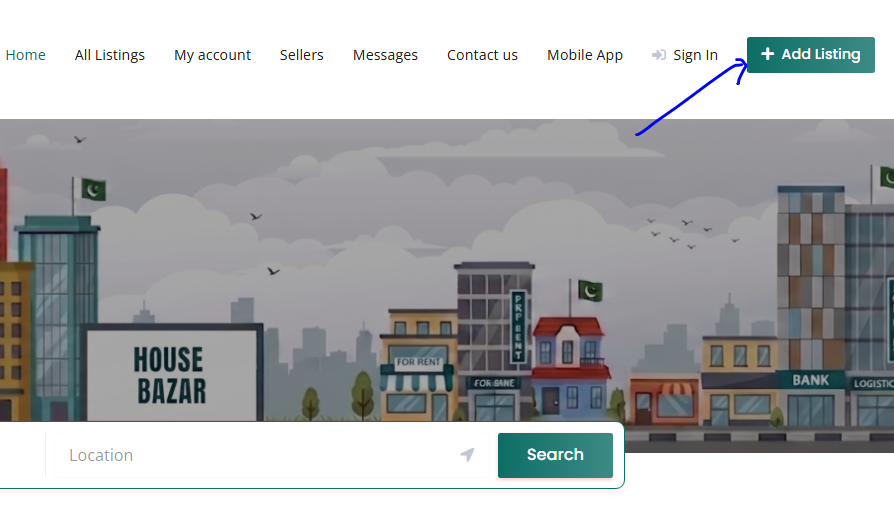
If you are Using House Bazar Mobile App after login with google. On the Home screen click on the big Plus button in the bottom bar.
Add listing Screen will open.
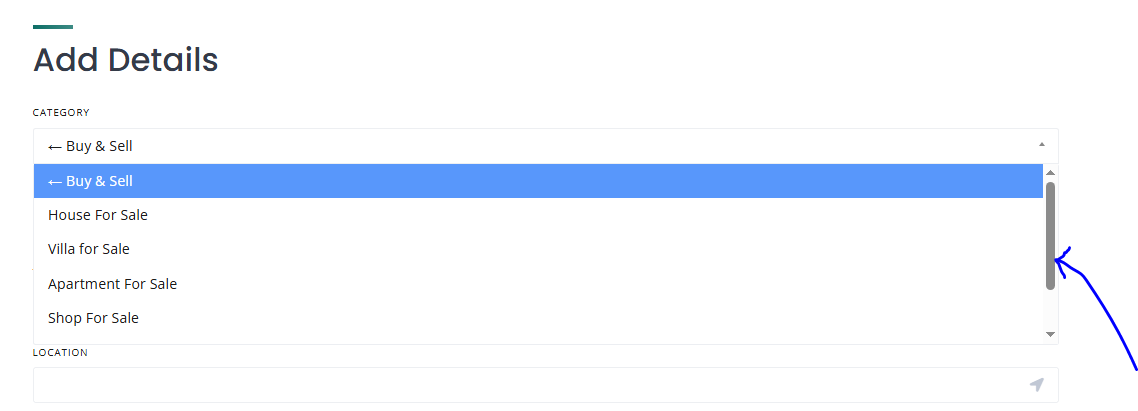
Step 3: Choose the Right Category
This step matters more than it looks. Choosing the correct category decides whether the right audience actually sees your property. On HouseBazar, you’ll find these main categories:
- Buy & Sell… House, Apartment, Villa, Shop, Plot, Building
- For Rent… House, Flat, Shop, Office, Warehouse, Land
- Hostels & Rooms… Boys Hostel, Girls Hostel, Hotel Room
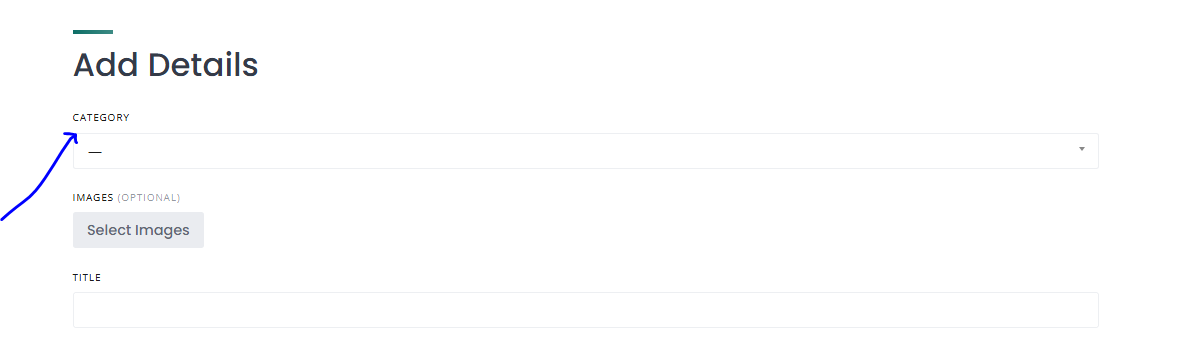
Take a moment here and pick the category and sub-category that best fits your property. A wrong category means your listing simply won’t reach the people actually searching for it.
Note: some categories will not show until you scroll down to bring them up.
Step 4: Add Good Quality Photos and a Video
This is the single biggest factor in whether people click on your listing or scroll straight past it.
Images: Here you can upload upto 15 images from your device related to your property.
Take photos in daylight… avoid using your camera’s flash indoors.
Photograph every room separately… bedroom, kitchen, washroom, and the exterior view too.
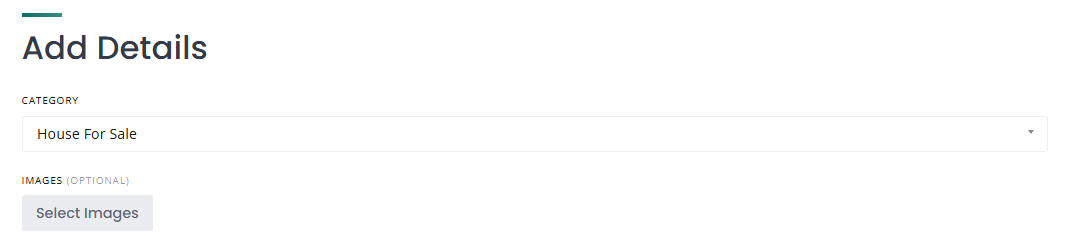
Note: You cannot upload videos at this step. For uploading videos see Step 8 below.
Step 5: Fill in Your Title and Area Location
This is where a little extra effort pays off. The more complete and accurate your listing, the faster genuine buyers will reach out to you.
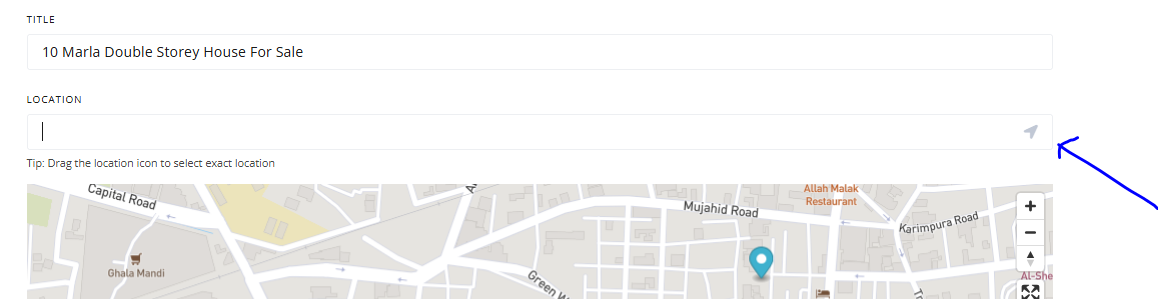
- Title: Be specific and clear. “10 Marla Double Storey House For Sale… Bahria Town Lahore” performs far better than just “House For Sale.”
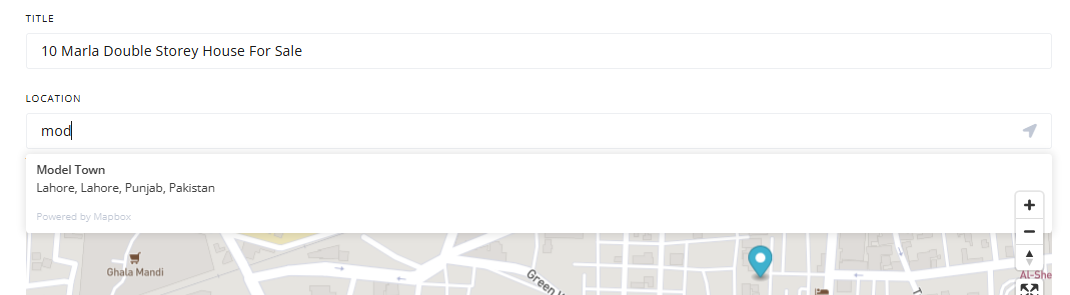
- Location: This field is for the location of your city or big city area. Not your street address. You will type your street address later in the “Detailed Address” field below. To automatically type location, you can simply click on the arrow symbol in the right corner. It will automatically type your current area location.
- Alternatively, you can type first three letters of your city of large city area, and it will show suggesstions in the dropdown, from where you can select your area location.
Step 6: Set Your Exact Location Pin on the Map
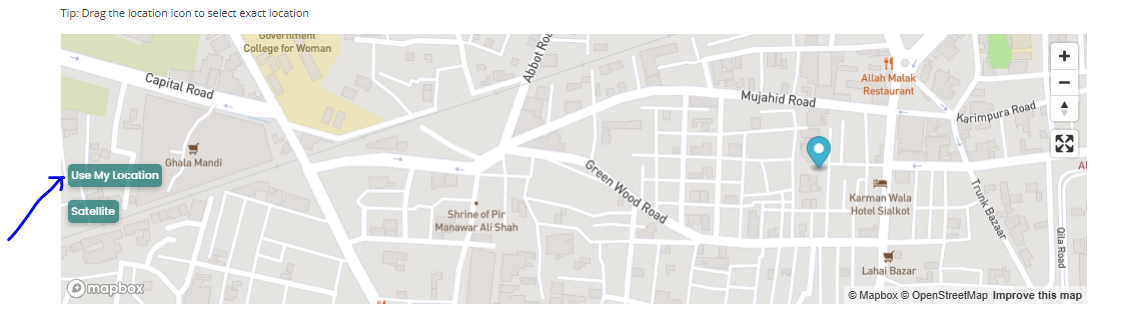
- Location (On Map): This is the most important step. In this step you will select the exact pinpoint location of your property on the map.
For this on the mapbox block first click on the “Use my Location” button this will bring the location of map in your current area.
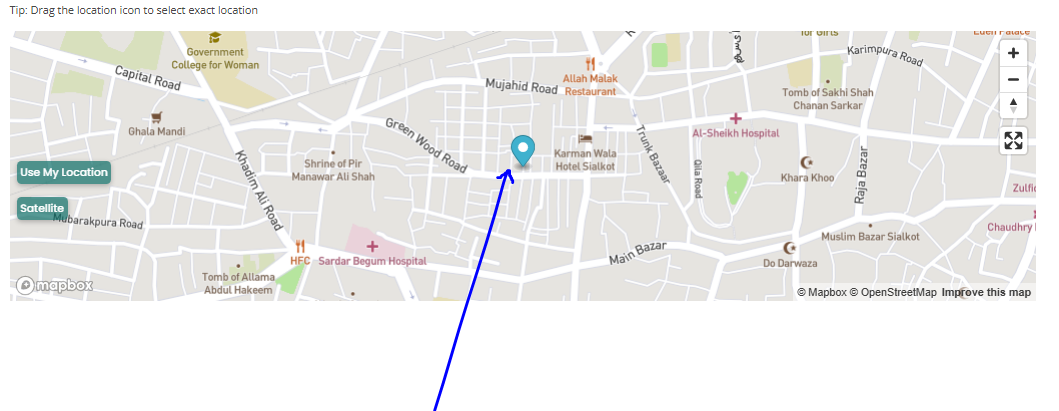
- Then Drag the Blue Location Pin on the map to exactly select your property and drop the pin there. You can easily drag the pin on the map using mouse pointer on your finger on touch screen.
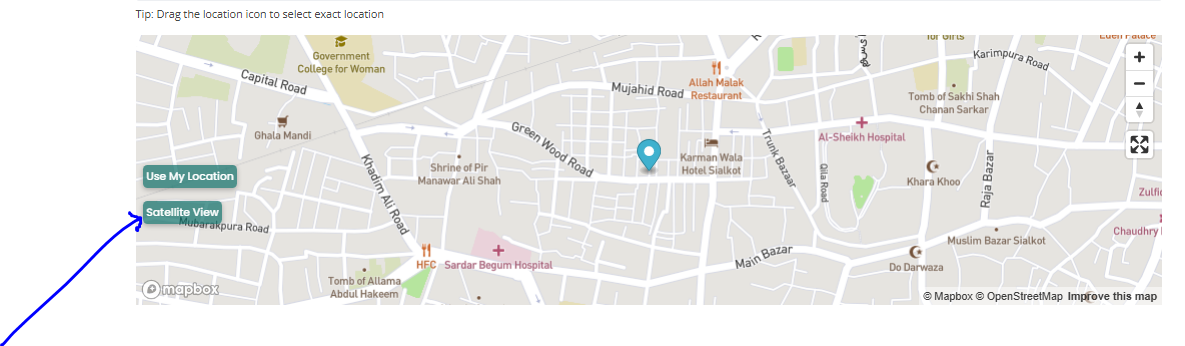
- You can also change the view to “Satellite” view to see more details clearly, by just clicking on “Satellite” Button.
Step 7: Set Price, WhatsApp no. and Detailed Address
- Price: Add an accurate, up-to-date price. Buyers tend to skip listings with vague or outdated pricing. Never mention wrong price, as people can comment below your listings and report to House Bazar.
- Price can only be written in digits (e.g. 123) without any letters or units (No “Lakhs” and No “Crores”), because this method will help people to apply price filter easily.
- (Note: If you deliberately mentioned wrong or low price and asked for a high price during chat, your account could be blocked after multiple people report you or comment below your listings.)

- For all Rental categories and Hostels categories you will enter monthly rental price, Similarly, for Hotel category, you will enter daily basis rental price.
- WhatsApp No.: In this field you can simply type your active WhatsApp number. But people can still message you inside the app. With WhaatsApp button, buyers do not need to first save your number in their phone and then contact you, instead they can just directly contact you with one click on Your WhatsApp button on House Bazar. This is completely free of cost, and secure because of end to end encrypted chat of WhatsApp, means your conversation will not be monitored by any third party or platform on WhatsApp chat. The one click direct WhatsApp conversation start button with seller is direct response to those platforms who monitor conversation between buyers and sellers by keeping their messages only on their platform (No WhatsApp).

- Detailed Address: In this field, you will simply type your complete address, including house number or plot number, street, Mohallah, Near by, Town City etc.

Step 8: Set YouTube Video Link Description and other fields
- YouTube Video Link (optional): If possible, record a short walkthrough video on your phone, Listings with a video consistently get more trust and more inquiries. If you want to show video of your property, simply upload your video on youtube and paste the video link here. Your video will automatically show and play in House Bazar App.

- Description: Write it the way you would explain the property to someone over a phone call. Mention nearby facilities, road width, what’s included, and anything that makes the property stand out.
Note: All the above mentioned Fields were generalized fields, means they are similar for all categories, while below mentioned fields are specific to only several categories.
- Marla: Here you will type area of your property in Marla. If this option is mandatory for any category then you must fill this with your property area in Marla, for any other unit convert it to Marla for example instead of 1 Kanal you will write “20” in Marla field. But if “Marla” field is optional, then you can skip it and write area in other field like “Acre” or “square feet”.

- Other Fields: Other fields includes the Advance Payment, Water, Electricity, SuiGas, Room Type, Minimum stay and more… All of these are self explanatory.
Step 9: Check “Green Property Certificate” field
Check this field only if you have Green Property Certificate field for your property. For more details about “Green Property Certificate” on House Bazar read this very helpful article.

Step 10: Publish Your Listing
Before you go live, take a moment to preview your listing. Double-check that the price is correct, the photos have loaded properly, and there are no typos in your description. Once everything looks good, check mark the terms and conditions field to confirm you agree with all the terms and click “Submit Listing” button.

Then you will be redirected to choose plan page. You can select a free listing plan or featured listings plan.
If you clicked on the free listings plan your listing will be submitted for review and will be published after review from House Bazar team. And you will be notified through email about your listing status.
Congratulations… your listing is now live, and visible to people searching across Pakistan!
A Few Tips to Get More Inquiries
- Update your listing every month so it stays fresh in search results.
- Price your property realistically… not too high, not underpriced either.
- Avoid writing “call for price”… a clear, upfront price builds more trust with buyers.
- Reply to WhatsApp messages quickly. The faster you respond, the higher your chances of closing the deal.
Frequently Asked Questions (FAQs)
Kya HouseBazar par listing dalna free hai?
Ji haan, aap apni 3 listings bilkul free post kar sakte hain or free ma renew kar sakty han 30 days k bad. Iske ilawa, agar aap extra listing chahtay hain, to sirf Rs. 500 ka minor charge hai…
Kya main apni listing baad mein edit kar sakta hun?
Bilkul. Aap apne dashboard se kabhi bhi price, photos, ya description update kar sakte hain.
Kya hostel listing bhi isi tarah post hoti hai?
Ji haan, hostel listing bhi bilkul isi process se post hoti hai. Bas category mein “Boys Hostel” ya “Girls Hostel” select karna hota hai, aur seat-wise rent detail add karni hoti hai.
Buyer ya tenant mujhse kaise contact karega?
Har listing par ek WhatsApp button ya Reply message button hota hai. Log usi button se seedha aap ko message kar sakte hain… koi app download karne ki zaroorat nahi hoti.
Final Word
Selling or renting out a property shouldn’t feel like a struggle. That’s exactly what free property listing platform “House Bazar” is here for… putting you back in control of your own property, without heavy commissions or middlemen slowing things down.
So why wait? Pick up your phone, head over to housebazar.pk, and post your first listing today. Your next buyer or tenant might just be one WhatsApp message away.
Comments